SCoRe-LFC: Platform data on crowd collaboration in higher education
Authors/Creators

- 1. Christian-Albrechts-Universität zu Kiel
Description
SCoRe (short for Student Crowd Research) was a joint research project between the Universities of Bremen (UB), Hamburg (UHH) and Kiel (CAU), the Macromedia University of Applied Sciences (HMM) and the Ghostthinker GmbH (GT). The overall aim of the project was to develop a digital learning and research environment as well as didactic scenarios that foster collaborative processes of research-based learning in large groups of students (crowd). The main subject area was research for sustainable development. Towards this end, the project consortium drew on the partners’ expertise on advanced video-technologies (HHM), virtual collaboration in interdisciplinary and largescale groups (CAU), research-based learning (UHH) and education and research for sustainable development (UB). To achieve its goals, the project adopted a design-based research approach. The Project started in Oct. 2018 and was funded for 3.5 years by the Federal Ministry of Education and Research (BMBF) in a funding scheme on digital higher education.
The work in the department of media-pedagogy and educational computer sciences at Kiel University was focused on the sub-project „SCoRe - learning and researching in the crowd“. The sub-project was aimed at the development, implementation and evaluation of pedagogical and organizational measures for the seeding, coordination and orchestration of collaborative research and learning processes in crowd scenarios. Particular emphasis was placed on crowd-specific characteristics of productive knowledge work in large and interdisciplinary groups.
This dataset contains interaction data as well as textual content data. As ongoing development of the software platform led to a continuous integration of new features into the platform itself as well as changes to the data collection functions, making this an evolving dataset. Some inconsistencies exist due to software bugs.
Platform data structure diagram
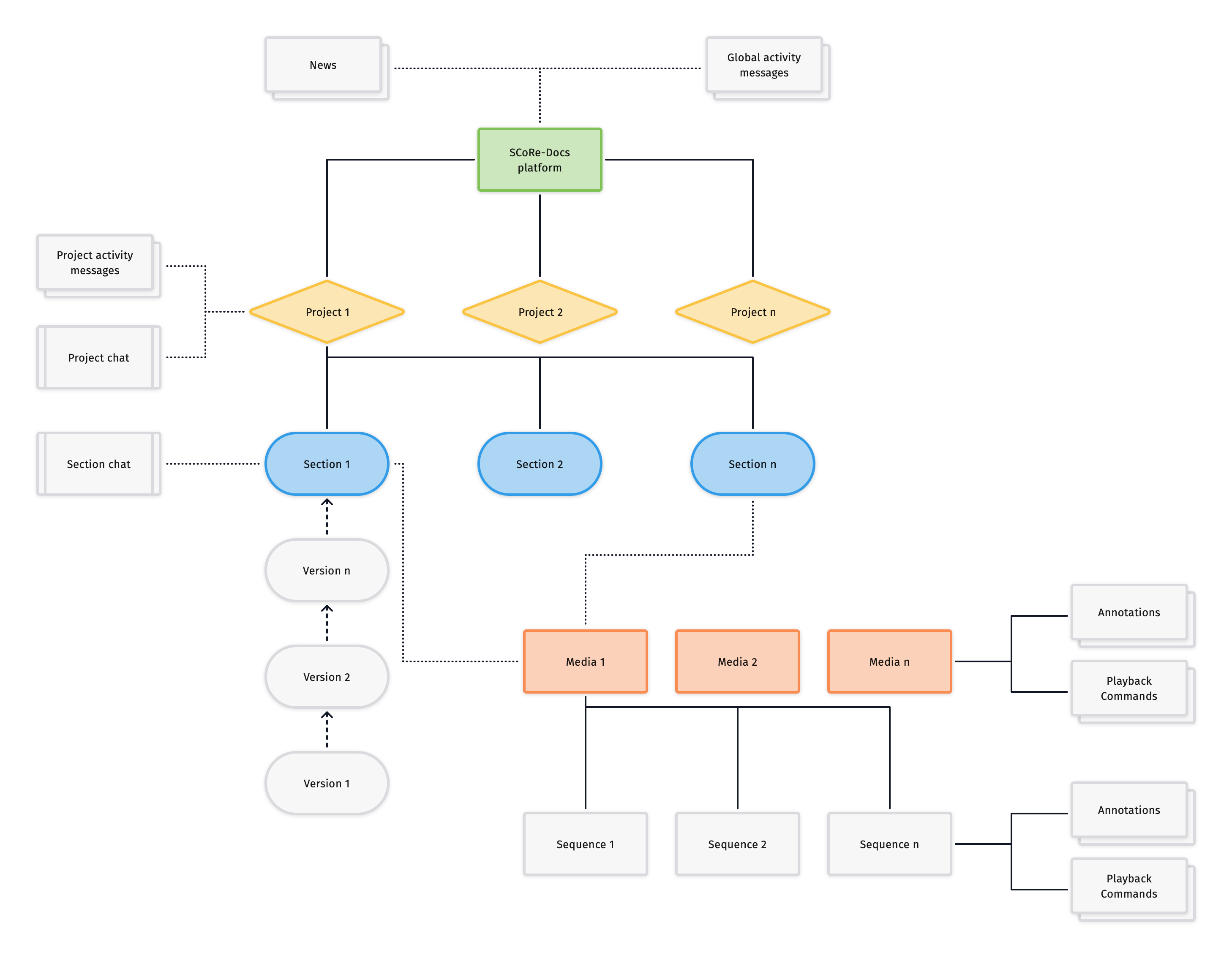
Further Readings to gain an understanding of the platform and its interaction posbilities (in german):
Contained Files
|
Filename |
Description |
|
annotations.csv |
Annotations (comment and/or drawings on the video) of video files |
|
content.csv |
Content of sections |
|
events.csv |
All events triggered by user interaction |
|
media.csv |
Uploaded images and videos |
|
messages.csv |
|
|
sequences.csv |
Sequences of video files |
Columns
(not all are present in each file. 0, “null” or “none” might mean not applicable)
|
Column name |
Description |
Format |
|
Index (empty column name) |
unique identifier of the corresponding event in the original dataset |
UUID (int on rare occasions) |
|
Actor-Name |
Unique identifier of an actor – “MA” identifies project staff |
string |
|
Annotation-ID |
Unique identifier of an annotation |
int |
|
Annotation-Text |
Label of an annotation |
string |
|
Version-ID |
Unique identifier of a version of an auditable object (e.g. a section) |
int |
|
Version-Changelog |
Changelog message on saving a new version of a section |
string |
|
Case-ID |
Unique identifier of a case (if applicable, coded by research team) |
String |
|
Media-Caption |
Title of a media file (image, video) |
string |
|
Media-ID |
Unique identifier of a media file (image, video) |
int |
|
Media-Timestamp |
Timestamp in a video |
int |
|
Message-ID |
Unique identifier of a chat message |
int |
|
Message-Text |
Content of a chat-message |
string |
|
Object-Type |
Type of an object an action refers to |
string |
|
Project-ID |
Unique identifier of a project |
int |
|
Research-Task-Type |
Type of research task (if applicable, coded by research team, see table below) |
string |
|
Section-Content |
Content of a section (in a specific version) |
string |
|
Section-Outline-Level |
Outline level of a section (in a specific version) |
int |
|
Section-ID |
Unique identifier of a section |
int |
|
Section-Index |
Position of a section in the project (in a specific version) |
int |
|
Section-Status |
Status of a section |
int |
|
Section-Title |
Title of a section (in a specific version) |
string |
|
Sequence-Description |
Description of a video sequence |
string |
|
Sequence-Duration |
Length of a video sequence |
int |
|
Sequence-ID |
Unique identifier of a sequence |
int |
|
Sequence-Timestamp |
Timestamp of the start of a sequence in a video |
int |
|
timestamp |
timestamp of an event |
datetime |
|
Verb |
Action type of an event (see table below) |
string |
Verbs
|
Value |
Description |
|
canceled editing of |
Actor canceled editing of a section |
|
clicked |
Actor clicked a link |
|
collapsed |
Actor collapsed a section (hides its content form being viewed) |
|
compared versions of |
Actor compared two versions of a section |
|
created |
Actor created a new section, video sequence, video annotation, video playback command, project or news |
|
deleted |
Actor deleted a section, video sequence, video annotation, video playback command, project or news |
|
ended |
Actor played a video hitting its end |
|
expanded |
Actor expanded a collapsed section |
|
inserted |
Actor inserted a video comment (on occasions instead of created) |
|
left |
Actor left a context (e.g. a project, a chat window) by e.g. closing it using platform functions, changing a browser tab, etc. |
|
mentioned |
Actor mentioned another actor in a chat message |
|
opened |
Actor opened a context (e.g. a project, a chat window) by e.g. accessing it using platform functions or changing a browser tab |
|
paused |
Actor paused a video |
|
played |
Actor played a video |
|
read |
Actor read an activity message or news |
|
read all messages and activities of |
Actor used switch to mark all chat and activity messages read |
|
restored |
Actor restored a deleted section |
|
reverted |
Actor restored a deleted section |
|
reverted version of |
Actor reverted a section to an earlier version |
|
seeked |
Actor seeked on a video timeline |
|
sent |
Actor sent a chat message |
|
started editing of |
Actor started editing of a section |
|
switched |
Actor switched chat focus between project and section chat |
|
typed |
Actor typed into the chat |
|
updated |
Actor updated an existing section (changing content, heading, heading-depth or status), video sequence, video annotation, video playback command, project or news |
|
uploaded |
Actor uploaded an image or video |
|
viewed |
Actor viewed an entity (had it on screen for 5 seconds), e.g. a section or video comment |
|
viewed history of |
Actor viewed history of a section |
Project-ID
|
Project-ID |
Case-IDs |
Title |
Type |
Period |
|
2 |
a1-a* |
Urbane Grünflächen |
Research project |
1.11.20-31.3.21 |
|
4 |
b1-b* |
Nachhaltiger Verkehr |
Research project |
1.11.20-31.3.21 |
|
166 |
c1-c* |
UGF - Urbane Grünflächen |
Research project |
1.4.21-30.09.21 |
|
168 |
|
LGS - Foyer |
Onboarding of students in LGS Projects |
1.4.21-30.09.21 |
|
188 |
|
LGS - Reflexionsraum |
Reflection project for students in LGS Projects |
1.4.21-30.09.21 |
|
207 |
|
LGS - Nachhaltiger Konsum |
Research project |
1.4.21-30.09.21 |
|
210 |
|
LGS - Bildungsangebote für nachhaltige Entwicklung |
Research project |
1.4.21-30.09.21 |
|
264 |
|
LGS - Fahrradmobilität in Städten |
Research project |
1.4.21-30.09.21 |
|
271 |
|
Fahrradmobilität in Städten |
Research project |
1.10.21-30.11.21 |
|
269 |
e1-e* |
Kaufentscheidung vs. Nachhaltigkeit |
Research project |
1.10.21-30.11.21 |
|
262 |
d1-d* |
Urbane Grünflächen |
Research project |
1.10.21-30.11.21 |
|
199 |
|
Basiskurs |
Basic course for onboarding of students on the platform |
1.10.21-30.11.21 |
|
5 |
|
Glossar |
Glossar of definitions |
persistent |
|
6 |
|
Erste Schritte |
How to start using score-docs platform |
persistent |
|
8 |
|
Testbereich |
Area for testing score-docs functionalities |
persistent |
|
7 |
|
Hilfestellungen |
Helpful links |
persistent
|
Other Project-IDs refer to personal assessment documents of individual students which are not included in content.csv
Research-Task-Type
|
Value |
Description |
|
Erheben |
Data collection |
|
Analysieren |
Case-specific data analysis and sensemaking |
|
Synthetisieren |
Cross-case data analysis and sensemaking |
|
Sonstiges |
Other, e.g. communication between participants |
Files
annotations.csv
Files
(140.7 MB)
| Name | Size | Download all |
|---|---|---|
|
md5:46a4a16f98d0f5c8ad5bc043d0425126
|
228.9 kB | Preview Download |
|
md5:ecd87850c9f4dac40da2bcb5758544cc
|
71.0 MB | Preview Download |
|
md5:5c420ee8cbe9dce85eca312894c6b1f2
|
69.2 MB | Preview Download |
|
md5:4f717225c1f48a2b73a8c32523d40f66
|
209.3 kB | Preview Download |
|
md5:d1e844bd3957f96cec0708c447341f34
|
38.0 kB | Preview Download |
|
md5:1b9ccd07e0085f5bb2ccc260189cb8f6
|
63.6 kB | Preview Download |