SpecTwin
Authors/Creators

-
1.
 Federal Institute For Materials Research and Testing
Description
# SpecTwin
SpecTwin is a modular Python application for X-ray emission spectroscopy workflows. It combines:
- **Digital Twin simulation** based on `xrt`
- **AutoFDMNES** workflows for material-aware spectral simulation
- **Data visualization and processing** tools
- **Subpixel/event analysis** utilities
- **Dear PyGui** based graphical interfaces
The repository is currently structured as a desktop application and is mainly intended for **Windows** use, especially because it includes an `fdmnes_win64.exe` executable.
---
## Video demos
The following videos show the main workflows currently implemented in SpecTwin:
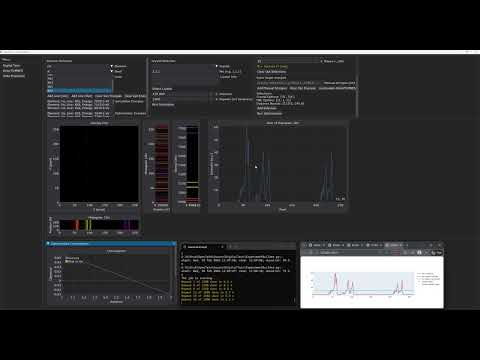
### Digital Twin workflow
[](https://www.youtube.com/watch?v=hH9EX2Ia6WU)
Demonstration of the digital twin workflow for simulation-driven spectrometer setup and optimization.
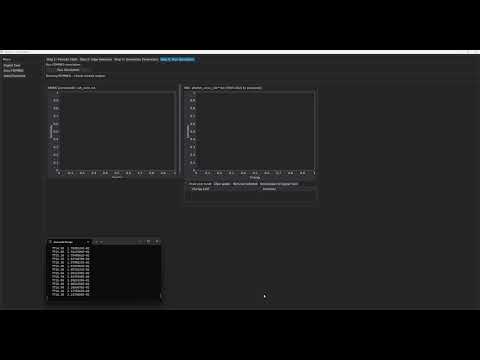
### XES simulation workflow
[](https://www.youtube.com/watch?v=jMjhRHJ3Juo)
Demonstration of the XES simulation workflow implemented in the AutoFDMNES module.
## Repository structure
```text
SpecTwin/
├─ Source/
│ ├─ SpectwinMain.py # Main application window
│ ├─ StartScreen.py # Start screen / launcher
│ ├─ AutoFDMNES/ # FDMNES-based material simulation module
│ ├─ DigitalTwin/ # xrt-based digital twin module
│ ├─ DataVisualization/ # plotting and visualization tools
│ ├─ DataAlligning/ # data processing / alignment tools
│ ├─ MergeData/ # merge utilities
│ ├─ SubPixel/ # event/subpixel analysis tools
│ ├─ fonts/
│ └─ img/
└─ xrt_update/
└─ screens.py # patched xrt backend file
```
---
## Requirements
Recommended setup:
- **OS:** Windows 10/11
- **Python:** a clean virtual environment is strongly recommended
- **Git** for cloning the repository
Main Python dependencies used by the project include:
- `dearpygui`
- `numpy`
- `pandas`
- `scipy`
- `matplotlib`
- `plotly`
- `Pillow`
- `h5py`
- `silx`
- `scikit-optimize`
- `xraydb`
- `xrt`
- `mp-api`
---
## Installation
### 1. Clone the repository
```bash
git clone <your-gitlab-repo-url>
cd SpecTwin
```
### 2. Create and activate a virtual environment
#### Windows (PowerShell)
```powershell
python -m venv .venv
.\.venv\Scripts\Activate.ps1
```
#### Windows (cmd)
```cmd
python -m venv .venv
.venv\Scripts\activate
```
### 3. Install Python dependencies
You can install the packages manually:
```bash
pip install --upgrade pip
pip install -r requirements.txt
```
If you do not yet have a `requirements.txt`, use:
```bash
pip install dearpygui numpy pandas scipy matplotlib plotly pillow h5py silx scikit-optimize xraydb xrt mp-api
```
### 4. Patch `xrt` with the custom `screens.py`
After installing `xrt`, copy the patched file from this repository:
```text
xrt_update/screens.py
```
into your Python environment here:
```text
Lib\site-packages\xrt\backends\raycing\
```
So the final target file becomes:
```text
Lib\site-packages\xrt\backends\raycing\screens.py
```
This step is required because SpecTwin uses a customized version of `screens.py` for the digital twin workflow.
### 5. Check bundled resources
Make sure these folders remain next to the source code:
- `fonts/`
- `img/`
- `AutoFDMNES/fdmnes_Win64/`
The application expects these files at runtime.
---
## Running the application
From the `Source` folder:
```bash
cd Source
python StartScreen.py
```
Alternatively, to open the main application directly:
```bash
cd Source
python SpectwinMain.py
```
---
## Modules
### Start screen
`StartScreen.py` opens the landing page and launches the main application.
### Main control panel
`SpectwinMain.py` provides access to the core modules:
- **DigitalTwin**
- **VisualizeData**
- **ProcessData**
- **SubPixelResolution**
- **Merge .h5/.evt Files**
- **AutoFDMNES**
### AutoFDMNES
The `AutoFDMNES` module supports:
- material lookup
- CIF retrieval
- FDMNES input generation
- EXAFS/XES simulation setup
- output/job management
### Digital Twin
The digital twin module is built around `xrt` and is used for simulation-driven geometry and analyzer optimization.
---
## Notes on FDMNES
This repository includes Windows-specific FDMNES binaries under:
```text
Source/AutoFDMNES/fdmnes_Win64/
```
---
## Materials Project API
The AutoFDMNES module uses the Materials Project API for CIF retrieval.
The key need to enter in mpr.py
```text
Source/AutoFDMNES/mpr.py
```
---
## Troubleshooting
### `Font file not found`
Run the application from the `Source` directory so that relative paths to `fonts/` and `img/` resolve correctly.
### `ModuleNotFoundError`
Make sure the virtual environment is activated and all packages are installed.
### `xrt` simulation errors
Verify that the patched `screens.py` was copied into:
```text
Lib\site-packages\xrt\backends\raycing\
```
### FDMNES does not run
Check that `fdmnes_win64.exe` exists in:
```text
Source/AutoFDMNES/fdmnes_Win64/
```
## Citation / acknowledgement
Files
SpecTwinV1.zip
Files
(77.7 MB)
| Name | Size | Download all |
|---|---|---|
|
md5:9fbd0c54477d3c1eb6c25832b5bb6f3e
|
77.7 MB | Preview Download |
Additional details
Dates
- Submitted
-
2026-04-13
Software
- Repository URL
- https://github.com/cakirtufan/SpecTwin.git
- Programming language
- Python
- Development Status
- Active